Wave Settings
Wave Settings allow users to configure the direction and behavior of waves within the Weather & Environment module. Using intuitive circular dials, users can set the angle and direction for wave effects, ensuring accurate environmental simulation. This page explains how to access and adjust these settings, with visual guides to help users understand the controls.
Accessing Wave Settings


Wave Settings Overview
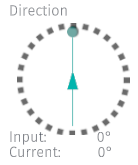
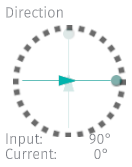
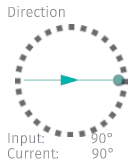
In general, the circular dials used for wave and wind settings represent the angle the setting is facing. Up is north. The arrow should be facing the direction you want the setting to be acting in.
In the figures below, Figure 1 shows the dial in its current state, which in this case is 0° North (Up). The Figure 2 shows the arrow rotated 90° to the East, indicating the adjusted direction for the wave or wind. The original direction is indicated by the faint arrow pointing to 0° North (Up). The Figure 3 confirms the chosen direction, 90° North (East) is now active. The values of Input and Current shows these values in degrees.
Unmodified dial |
Modified dial |
Applied dial |
|---|---|---|
Figure 1 |
Figure 2 |
Figure 3 |
Saving Settings

Press the Apply in 5s to apply settings in 5 seconds or press the Apply button to apply settings immediately.
Note
Please note that the “Auto apply” button must be in “Off” position for this button to be available.
General Settings
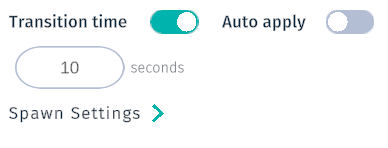
When the Transition time toggle is in “On” position (default), transition will blend between old and new value in the duration of the specified time.
Toggle the Transition time to the “Off” position to instantly change between settings when pressing the Apply button.
Toggle the Auto apply button to have settings auto applied after each adjustment in the ocean settings.
Tip
Setting a long Transition Duration can greatly enhance a video recording, for example by an increas in wind speed over time.
Swell
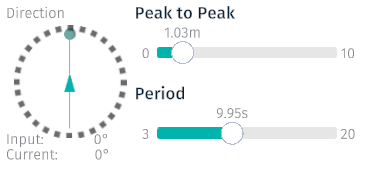
Adjust the swell direction by adjusting the Swell dial to the desired direction. The Peak to Peak slider adjusts the distance between the peaks of the swells. The Period slider adjusts the time between the swells.
Setting |
Range |
Unit |
|---|---|---|
Swell dial |
0-359 |
Degrees |
Peak to Peak |
0-10 |
Meter |
Period |
0-20 |
Seconds |
Wave
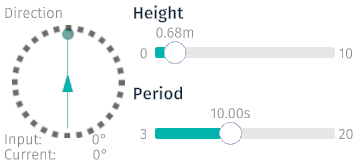
Adjust the wave direction by adjusting the Wave dial to the desired direction. The Height slider adjusts the height of the wave. The Period slider adjusts the time between the swells.
Setting |
Range |
Unit |
|---|---|---|
Wave dial |
0-359 |
Degrees |
Height |
0-10 |
Meter |
Period |
0-20 |
Seconds |
Current
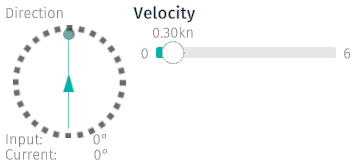
Adjust the current direction by adjusting the Current dial to the desired direction. Adjust the Velocity slider to set the desired wind speed in knots.
Setting |
Range |
Unit |
|---|---|---|
Current dial |
0-359 |
Degrees |
Velocity |
0-6 |
Knots |
Wind
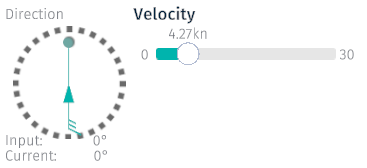
Adjust the wind direction by adjusting the Wind dial to the desired direction. Adjust the Velocity slider to set the desired wind speed in knots.
Setting |
Range |
Unit |
|---|---|---|
Wind dial |
0-359 |
Degrees |
Velocity |
0-30 |
Knots |