Using a 3D Mouse
Note
In order to use your 3D mouse, you will need to follow your device’s instructions on how to install the appropriate drivers. The information below assumes your drivers are installed and your 3D mouse is calibrated. If “Removable Devices” is missing, you may have omitted the required driver installation step outlined in the Install Amazon DCV client section.
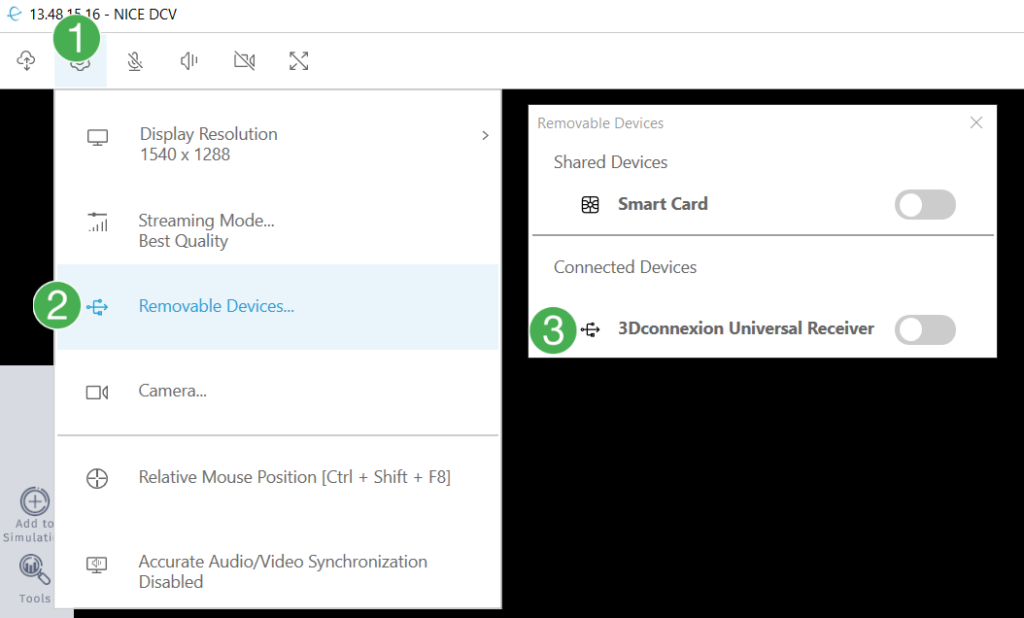
Enter the settings menu, indicated by the gear icon in the top left corner of the Amazon DCV viewer.
Enter the
Removable Devices…menu.If you have a 3D mouse connected, it should be displayed in the
Connected Devicessection. Click to toggle whether or not it should be enabled.