Sim Settings
The Sim Settings menu is used for adding and changing active scenarios. Having an active scenario selected is required for much of the functionality in the left-hand menu.
Accessing Sim Settings


Using Sim Settings
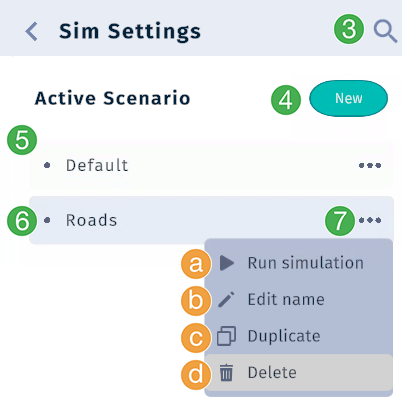
Search for a specific scenario by its name.
Add a new scenario based on the base scene. “New Scenario” is the default name of a new scenario.
List of scenarios
Active scenario is highlighted in gray
Context menu. Click the
...to get the following options:Run simulation. If the mobility module is installed, then click this button to run the simulationEdit name: Click to enter a new name, then press enter to save the new name.Duplicate: Creates a new scenario based on the selected scenario.Delete: Click to delete the scenario
Note
You cannot delete the base scenario. You also cannot delete a scenario that is currently active. To delete an active scenario, you must first switch to another scenario.