Sandbox Interface Overview
../_images/sandbox1.png

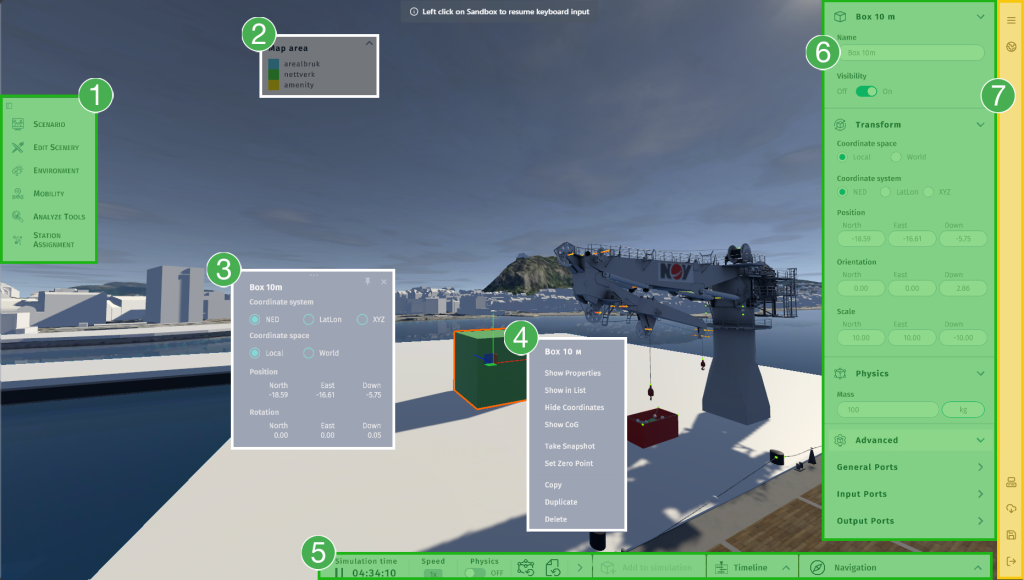
Sandbox Interface: All available menus and panels are highlighted in orange, green and white.

Introduction

There are two types of menus or panels in a Sandbox session: static and floating. Static ones are always located in the same place, while floating ones appear at the location of a mouse click or an object. The session menu overlays all other menus and should be minimized when not in use to avoid blocking other menus. Clicking on the three horizontal lines will expand or collapse the session menu.

Available Menus and Panels

  1. Sandbox menu (Fixed menu).

  2. Data legend (Floating panel). This panel will show if a supported dataset is turned on. Map Overlays and Buildings are supported data types for the legend.

  3. Transform Panel (Floating panel). This menu is available from the context menu of an object.

  4. Context Menu (Floating menu).

  5. Simulation Controls (Fixed menu). Besides controls for physics, this menu also has the expandable Timeline and On-Screen 3D Navigation panels.

  6. Properties Panel (Fixed panel). This panel appears when an object is selected with the left mouse button.

  7. Session Menu (Fixed menu). The session menu overlays all other menus and should be minimized when not in use.